|
Here are some questions and problems that people often encounter when using Jettison.
Before consulting this list or contacting us, please make sure you
are using the latest release of Jettison, version 1.8.7.
If you have a problem that is not addressed here or feel a question should
be here but isn't, please send mail to support@stclairsoft.com
When my Mac goes to sleep, it wakes up again less than a minute later to show a notification that Jettison ejected a disk.
When I return to my Mac after it's been asleep, there are a ton of notifications from Jettison on the screen.
These two problems are both caused by the same thing: Jettison's notifications are causing your Mac to wake from sleep.
As your machine prepares to go to sleep, it notifies Jettison so it can eject your external drives. Jettison dutifully does so, then enqueues a system notification to let you know. On some machines, this can actually cause the system to wake back up. It doesn't happen on all Macs, but when it does, it can result in the machine repeatedly sleeping and then immediately waking again.
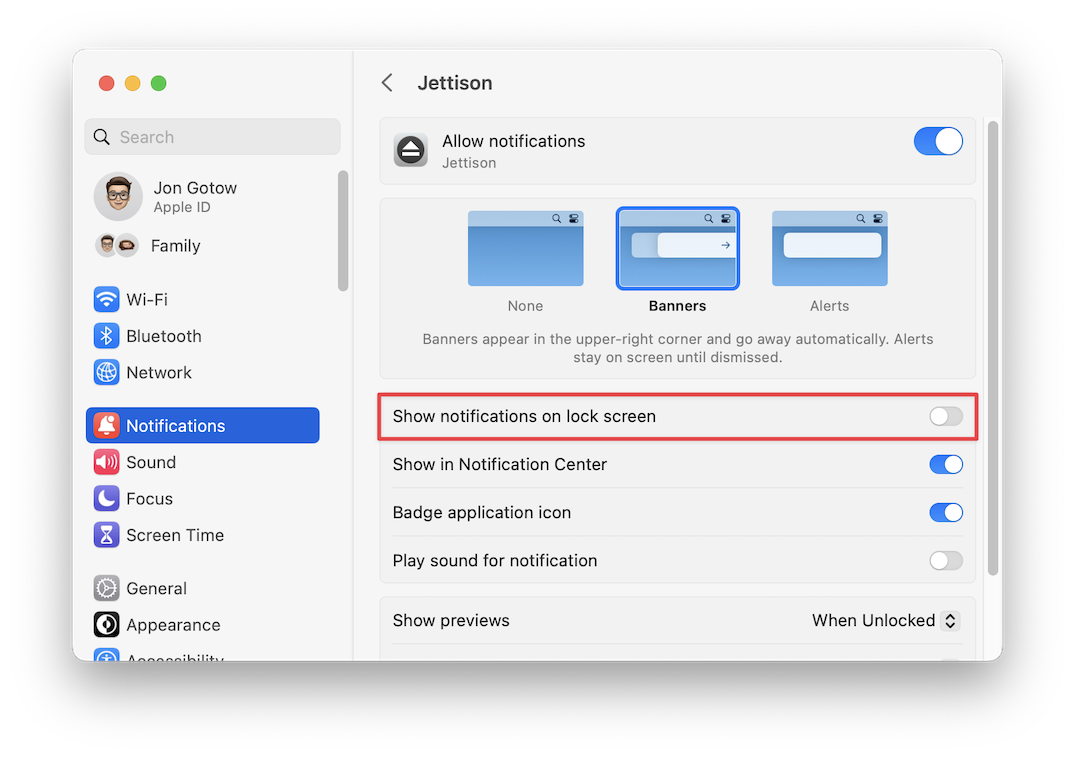
To avoid this problem, go to System Settings > Notifications > Jettison. In the settings there, turn off "Show notifications on lock screen".
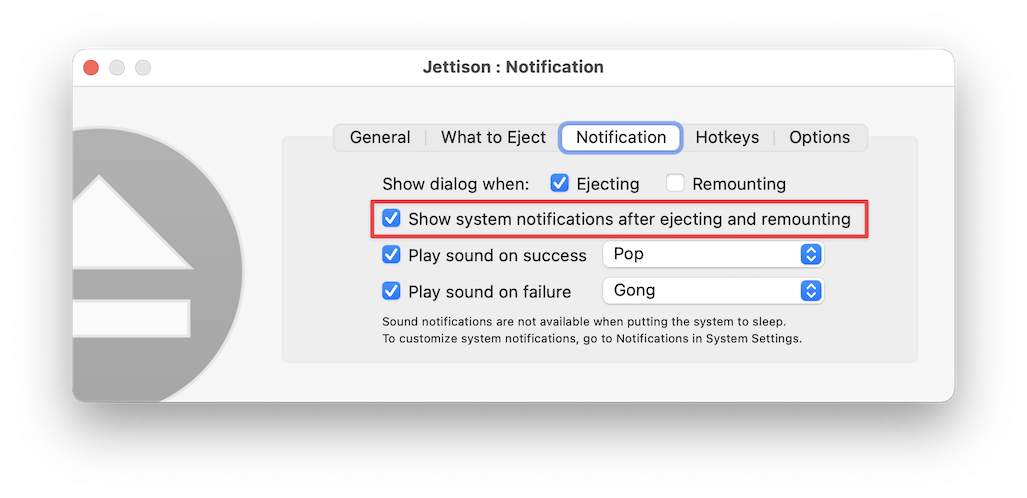
Alternatively, you can also just turn off "Show system notifications after ejecting and remounting" in Jettison > Settings > Notifications:
Jettison fails to eject or remount my external drives when the screen is locked.
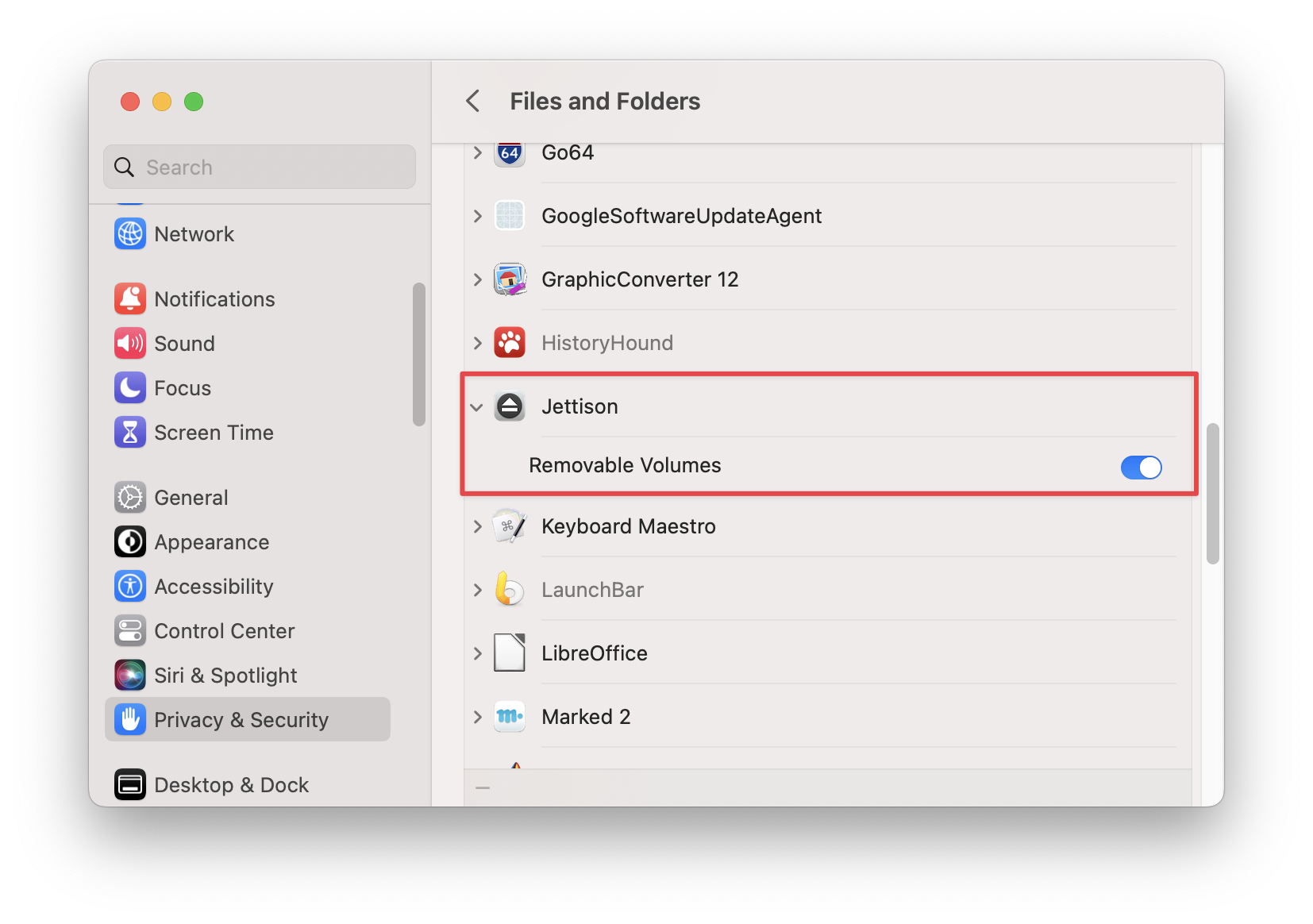
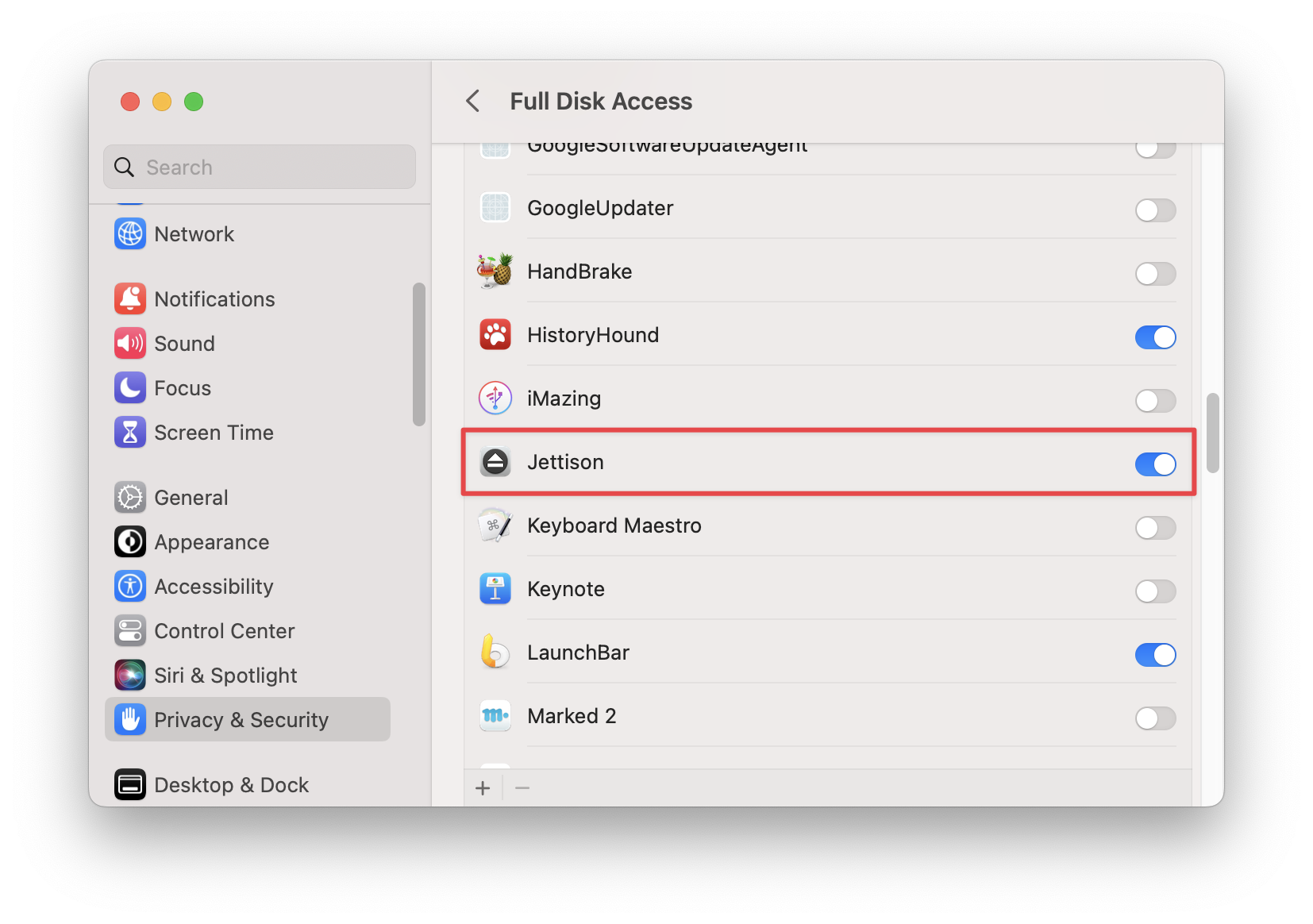
There are situations in which macOS may refuse to honor Jettison's requests to eject and remount drives because it doesn't think Jettison has sufficient privacy permissions. To fix this, please go to System Settings > Privacy & Security > Files and Folders and make sure that Jettison has permission to access removable volumes:
Then go to System Settings > Privacy & Security > Full Disk Access and ensure that Jettison is there, too. If it's not, use the '+' button below the list to add it:
Apple's Music app quits every time my Mac goes to sleep.
This is intentional behavior on Jettison's part. It can't tell whether Music has files stored on an external drive, so it quits Music upon sleep and relaunches it at wake-up to make sure that it isn't prevented from ejecting external drives.
You can turn this behavior off by running this command in Terminal:
defaults write com.stclairsoft.Jettison leaveAppsRunning 1
Of course, if you have your Music library on an external disk, turning this behavior off will prevent Jettison from ejecting that drive when Music is running.
Jettison is suddenly telling me it's no longer licensed. I bought it from the Mac App Store years ago.
If you bought Jettison from the Mac App Store, you may be suddenly seeing warnings from Jettison about it being unlicensed. This is because one of Apple's code signing certificates expired at the beginning of February, 2023. Jettison needs to re-validate your App Store receipt by copying it from a version of Jettison downloaded from the Mac App Store. At present, this is unfortunately a bit of a hassle - please follow these steps:
- If Jettison is running, quit it by choosing Quit from its menu in your menu bar.
- Delete all copies of Jettison from your Mac.
- Open the App Store application, click on the Store menu, then choose Account.
- Find Jettison in your list of purchases and re-download it by clicking on the cloud icon next to it.
- Visit our website and download Jettison from http://www.stclairsoft.com/Jettison/
- Click on the .dmg file to open it, then double-click on Jettison there. You'll see an alert telling you that Jettison has been upgraded using your App Store license.
- Copy Jettison from that window to your Applications folder.
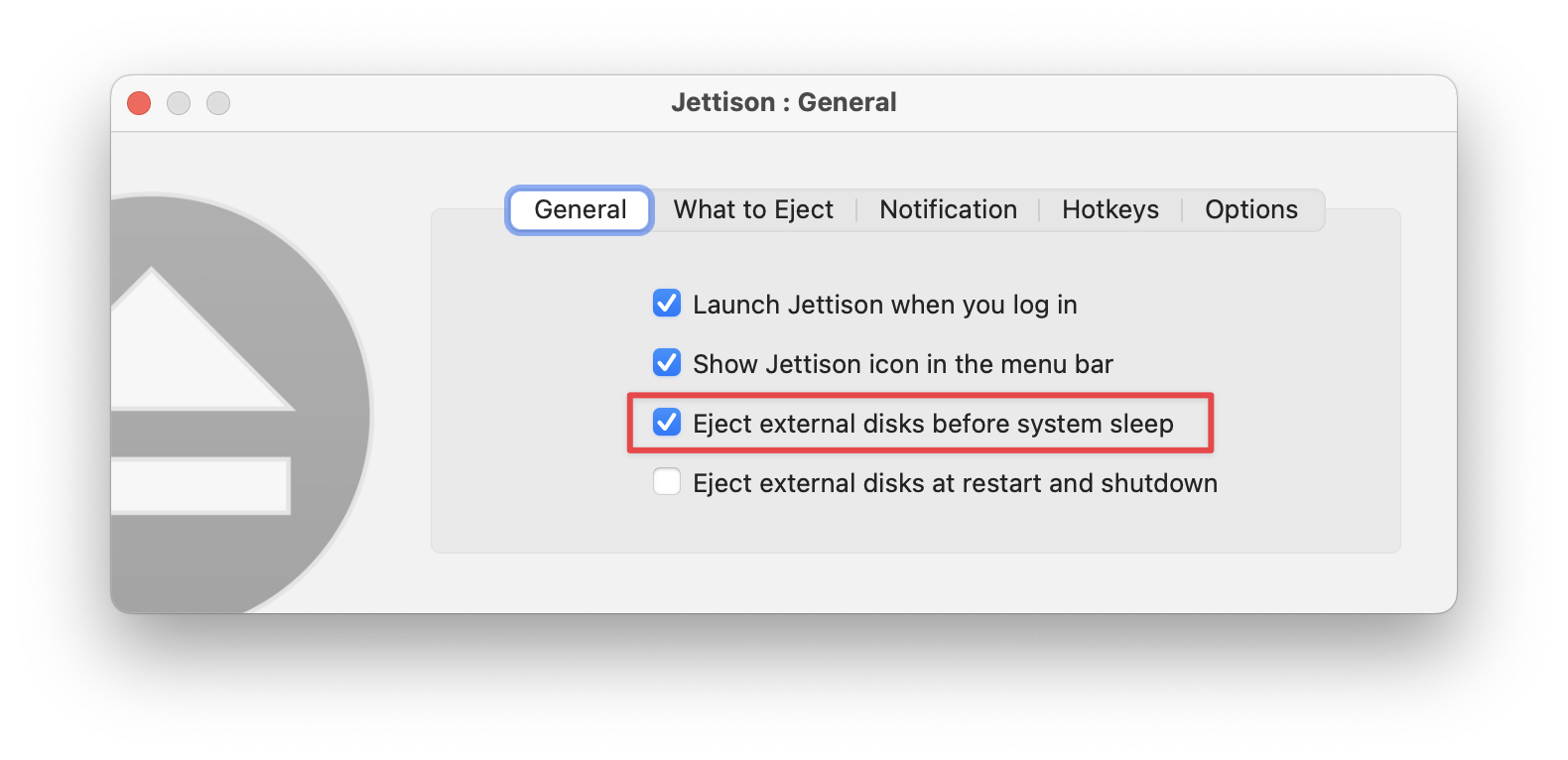
Jettison's icon in my menu bar is appearing as an outline. What's wrong?
 The outlined icon means that Jettison's "Eject external disks before system sleep" feature is turned off. Turn on this checkbox to enable it: The outlined icon means that Jettison's "Eject external disks before system sleep" feature is turned off. Turn on this checkbox to enable it:
I've installed Jettison, but I'm still getting "Disk
ejected improperly" errors. Why isn't Jettison working?
Jettison is almost certainly ejecting your drives as it's supposed to, but there
are some features in macOS that can still cause the error messages to show
up.
The short answer: Turn off problematic sleep behaviors using this applet:
https://www.stclairsoft.com/download/ManageSleepSettings.zip
(it also provides a button to turn them back on if you change your mind). Note: Among other things, this disables the TCP Keep Alive mechanism when the sytem is sleeping. This will result in Find My Mac not updating its location when the system is asleep.
The long answer(s):
-
The most common source of problems is the Power Nap feature in macOS (http://support.apple.com/kb/ht5394).
What happens is that Jettison ejects your external drive when you put your
computer to sleep, but your Mac wakes up later via Power
Nap and tries to do a Time Machine backup. Time Machine attempts to write data
to the drive even though it is not there, which causes the disk journaling
system (part of macOS that ensures data on your disk doesn't get corrupted)
to save the data so it can write it to the disk later. Then, when the computer
wakes up and the disk remounts, macOS sees an inconsistency between the data
in the disk journal and the drive, so it puts up the warning message.
If you have a Mac that supports Power Nap, you can see if this is the problem
by turning off
Power Nap. You'll find the setting in System Settings > Energy Saver. Note that some Mac models do not have Energy Saver settings in System Settings, and don't have a switch for disabling Power Nap.
-
MacBook models released after mid-2012 (and MacBook Airs after mid-2010) will enter
"safe sleep" mode after being asleep for a specific amount of time. The transition from
normal sleep to safe sleep can sometimes result in the "Disk ejected improperly" error
message.
You can disable safe sleep using the following commands in Terminal:
sudo pmset -a hibernatemode 0

sudo pmset -a autopoweroff 0

sudo pmset -a standby 0
For more information on safe sleep, hibernation, standby and autopoweroff
modes, see this article: http://apple.stackexchange.com/questions/113954/difference-between-autopoweroff-and-standby-in-pmset.
Apple also has its own Knowledge Base articles discussing
standby (http://support.apple.com/kb/ht4392)
and autopoweroff (http://support.apple.com/kb/HT1757).
-
In System Settings, select Battery or Energy Saver (depending upon your Mac model), click "Options" and then turn off "Wake for
network access." That can sometimes cause your Mac to partially wake from sleep,
resulting in "Disk ejected improperly" error messages even though the disk
was ejected correctly.
Note that this may still not be enough, as the Find My Mac feature may also periodically wake up the machine. To turn all "dark wake" features off, use this command in Terminal:
pmset -a tcpkeepalive 0
or download and run the applet given in the "short answer," above.
Jettison isn't remounting my password-protected external drive.
In order for Jettison to remount a password protected volume, the password must be saved in your Keychain. To set it up, manually mount the volume using Disk Utility, and when prompted for your password, click on the "Remember this password in my keychain" checkbox when you enter it. The next time Jettison attempts to mount the volume, you'll get a security confirmation to allow Jettison to access your keychain - grant it "always" access and then things should work.
I bought Jettison through the Mac App Store. Can
I upgrade directly from your web site?
Yes, just download the latest version of Jettison here.
Before copying the
new version to your Applications folder, however, please double-click it to
run it once directly from the disk image. Jettison will
make a copy of your App Store receipt (which is embedded in the Jettison application
that you downloaded from the Mac App Store). You can then copy Jettison to
your applications folder, deleting the version that you got from the Mac App
Store.
If you've already replaced your App Store copy of Jettison without running
it first, you'll need to backtrack a bit. Please do the following:
- If Jettison is running, quit it by choosing Quit from its menu in your menu bar.
- Delete all copies of Jettison from your Mac.
- Open the App Store application, click on the Store menu, then choose Account.
- Find Jettison in your list of purchases and re-download it by clicking on the cloud icon next to it.
- Visit our website and download Jettison from http://www.stclairsoft.com/Jettison/
- Click on the .dmg file to open it, then double-click on Jettison there. You'll see an alert telling you that Jettison has been upgraded using your App Store license.
- Copy Jettison from that window to your Applications folder.
Why can't Jettison eject one of my external
drives?
This happens when an application is accessing a file on your external drive.
Because the application will expect the file to still be there when your Mac
wakes back up, macOS won't let Jettison eject the drive. To fix this, you
need to determine which application is using the drive and either close the
file(s) that are on the drive or quit the application completely. Jettison
attempts to diagnose the problem and will let you know which files are open
if it can determine that.
How can I stop Jettison from remounting drives when my Mac wakes up?
- Select "Preferences" from Jettison's menu in the menubar.
- Click on the "Extras" tab.
- Turn off "Remount drives upon wake-up".
If you want to prevent just a single drive from remounting, you can add it to the "Don't remount these disks..." list in Jettison > Preferences > Extras.
Can I control what Jettison does with one specific disk or device?
Sure. Choose "Preferences" from Jettison's menu in the menubar,
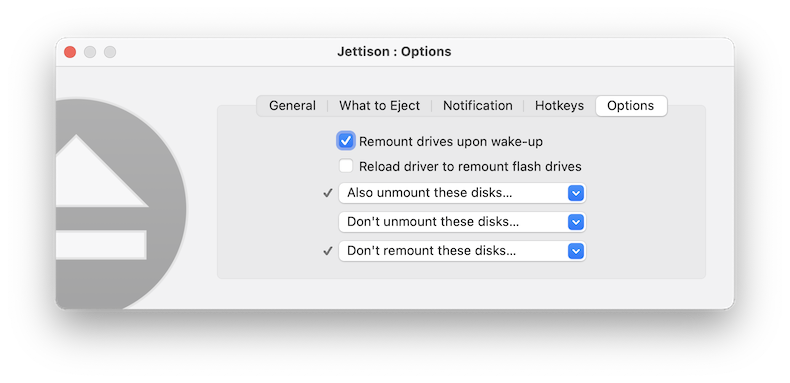
then click on the "Extras" tab in the preferences dialog. You'll see this:
You can choose drives from the "Also unmount internal disks", "Don't unmount external disks" and "Don't remount these disks" menus to fine tune what you want Jettison to do.
Jettison ejects my drives when I put my Mac to sleep manually, but not if it sleeps due to being left idle.
In many cases, this is due to the fact that your Mac, when left idle, isn't
actually going to sleep - it's just turning the display off. This can be caused
by a number of things, most often some software or hardware that explicitly
prevents macOS from entering sleep mode. You'll have to determine which application is keeping your Mac from sleeping - the easiest thing to do is to run the Terminal application and enter this command into it:
pmset -g assertions
Look for the string "PreventUserIdleSystemSleep" in the output - the application that made the request should be listed at the beginning of the line.
Jettison will not start up. It keeps saying it needs
to install its helper application and asking me for my administrator password.
This happens when another application has installed a helper app into the folder "/Library/PrivilegedHelperTools/" and has given the folder the wrong security permissions.
The easiest way to fix this is to download an AppleScript we've created called "Fix
PrivilegedHelperTools permissions". You can get it by clicking
here. Just
unzip the script application, double-click it, and type your administrator
password into the dialog box that comes up. After doing so, you should be
able to launch Jettison and install its helper application successfully.
How do I uninstall Jettison?
Just open your Applications folder and drag the Jettison application to the Trash.
If Jettison has installed its helper application, you can also remove that too, though it's not necessary to do so - the helper will never run once you remove the Jettison application from your computer. To remove the Jettison helper app, just locate and throw this file into the Trash:
/Library/PrivilegedHelperTools/com.stclairsoft.Jettison.DriverHelper
or just download and run this AppleScript applet:
http://www.stclairsoft.com/download/DeleteJettisonHelper.zip
Note that in either case you'll need to enter your Mac's administrator password to remove the helper app.
|